Build your own custom skill: the monthly PO accrual example
65 skills will never cover every need. An end-to-end walkthrough: install Skill Builder, use it to create a monthly PO accrual skill, call it on real data, and schedule it as a routine.

The problem
The library has 65 ready-to-use skills. But no library, however large, will ever cover a need specific enough: your target ERP, your entities, the exact output format your accounting team expects every month. That's exactly why we added Skill Builder to the library — a skill whose job is to create other skills, tailored to your need, from a plain-language request.
To show it end to end, we use a concrete case: generating a monthly PO accrual report, ready for a NetSuite export.
Install the skill
Like any skill in the library: download skill-builder, drop it into .claude/, no extra configuration.
Use it to create a new skill
Happy to. Three questions before I generate it:
Output format: an Excel file with several tabs (the report, a review of unattached invoices, and a correction tab), or just a summary in the conversation?
Currency: are all your purchase orders in the same currency, or do we need to keep several currencies separate?
Entities: a single entity, or several to consolidate?
Here's the generated skill:
po-accrual-monthly-export
1. List open purchase orders (`get_purchase_orders`, filtered on the current year)
2. Exclude POs already fully billed (`billedAmount >= amount`)
3. Compute the remaining monthly accrual per PO (remaining amount ÷ months left before the end date)
4. For high-stakes POs with no invoice received, check for unattached supplier invoices (`get_payables`)
5. Generate a 3-tab Excel file: Accrual Report, Unattached Invoices Review, Correction
Want me to test it right now on your real data?
Call the new skill
I reviewed 34 open purchase orders. 28 aren't fully billed yet — here's this month's accrual:
Total accrual (July 2026): €218,705.30 + $154,538.14 (kept separate, never summed)
File generated: `Accrual_Report_2026-07.xlsx` (3 tabs: Report, Review, Correction).
Illustration of the output
Here's the first tab of the file this skill actually generated, on demo data:
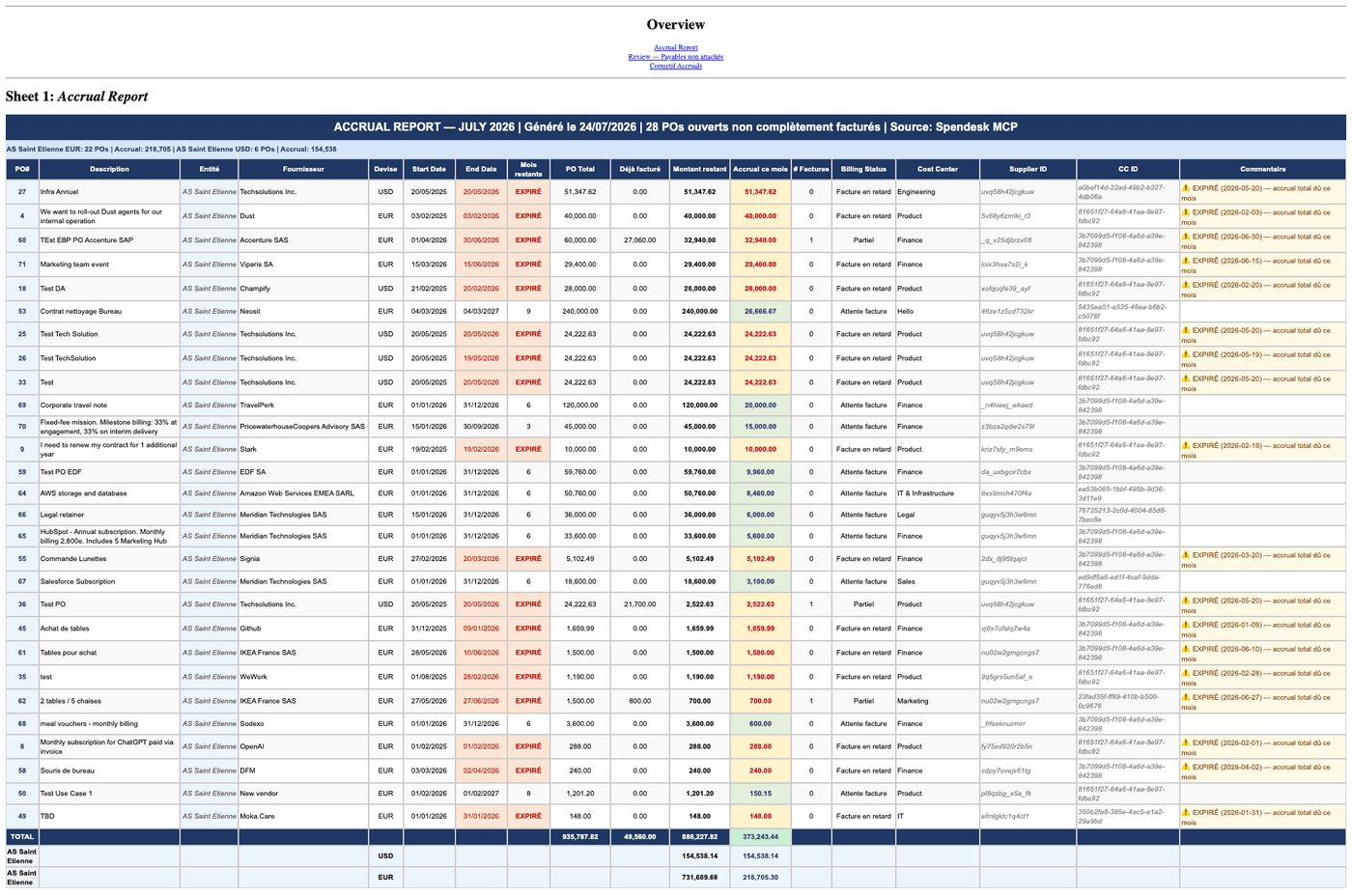
Each red row flags an expired PO (full accrual due this month), each green row is a monthly accrual still smoothed over several months — exactly the logic described in the generated skill above.
Schedule it as a monthly routine
Once the skill is validated, no need to rerun it by hand every month:
On the 1st of every month, run the po-accrual-monthly-export skill and send me the summary with the Excel file attached.
The full setup (and its limitation: the result stays in the conversation by default unless combined with a delivery channel) is covered in the guide Automating a report with routines.
Key takeaways
- Skill Builder turns a plain-language need into a tailored skill, tested on real data before it's handed over
- The PO accrual example shows the full flow: frame the need, generate the skill, test it live, illustrate its real output, then schedule it
- A skill generated this way stays a plain text file, just like the other 65 skills in the library
- Always test a generated skill on real data before treating it as reliable for recurring use
Related skills