MCP to MCP: automating an end-to-end accounting export between Spendesk and an ERP
Two ways to connect Spendesk to an accounting system with an agent: when both sides speak MCP (Spendesk ↔ Rillet), and when the other system doesn't have one yet (Spendesk ↔ NetSuite). Closing with a real look at which Spendesk customer ERPs already have an MCP in 2026.

The problem
Connecting Spendesk to a third-party accounting system has, until now, almost always meant putting an integration platform (an iPaaS like Chift) between the two — someone builds and maintains a dedicated connector for each pair of tools.
With the Model Context Protocol, another option shows up: an agent that calls each system's MCP tools directly, with no connector layer in between. Two very different cases show up depending on whether the other system does, or doesn't, have its own MCP server — and both exist today, tested under real conditions.
What is MCP-to-MCP?
MCP-to-MCP describes an integration where an AI agent connects directly to the MCP servers of two different pieces of software — here Spendesk and Rillet — with no integration platform (iPaaS) in between. Each system stays responsible for its own MCP; the agent's job is just to call the tools on both sides and make sure nothing gets created twice.
Why this matters, for a finance team
You don't need to understand OAuth or JWT to get the point. Today, connecting two finance systems usually means weeks of integration project work, a subscription to a third-party platform, and a connector to maintain long-term. With an agent calling each system's MCP directly:
- No integration project to launch — an agent orchestrates the exchange, not an engineering team writing a custom connector.
- Nothing extra to subscribe to — no third-party integration platform between the two systems.
- Native traceability — every write carries a reference back to its Spendesk origin, checkable at any time.
- Human control stays intact — a report details exactly what happened on every run, and a single closing step (marking it exported in Spendesk, by hand or with the
mark_payable_as_exported_manuallywrite tool, in Beta and off by default) closes the loop.
The rest of this article covers how it works technically — useful if you're an integrator or technical partner. If you're on the finance side, the above is the essential part.
MCP-to-MCP: Spendesk and Rillet talking directly
The cleanest case: both systems expose an MCP, and an agent (here Claude, as a scheduled routine) orchestrates the exchange between the two — no integration code to maintain on either side. What clients ask for most often: export payables to Rillet as soon as they're ready, without waiting for payment — settlement reconciliation follows afterward, in a second pass, at its own pace.
Spendesk side (MCP) — read tools only in this flow (the server also has 26 write tools, in Beta and off by default):
get_payables— payables ready to export (bookkeepingStatus = toExport)get_payable_attachments— to enrich a vendor at creation time (IBAN, address) from its invoiceget_settlements— cleared settlements, reconciled in a second passget_payable_by_id— to trace a settlement back to its associated payable, during reconciliation
Rillet side (MCP) — read and write:
- Vendor search by
external_reference, then by name - Vendor creation or update
- Vendor bill creation (idempotent)
- Search for an already-exported bill by reference, then bill payment creation
The principle that makes this reliable is idempotency via a native external reference: every Rillet object created carries an external_reference pointing back to the originating Spendesk ID ({ "type": "spendesk", "id": "<supplierId>" } for a vendor, <payableId> for a bill). On every run, the agent checks that reference before creating anything — no local mapping table to maintain; idempotency lives natively in both systems.
The flow, in two decoupled phases
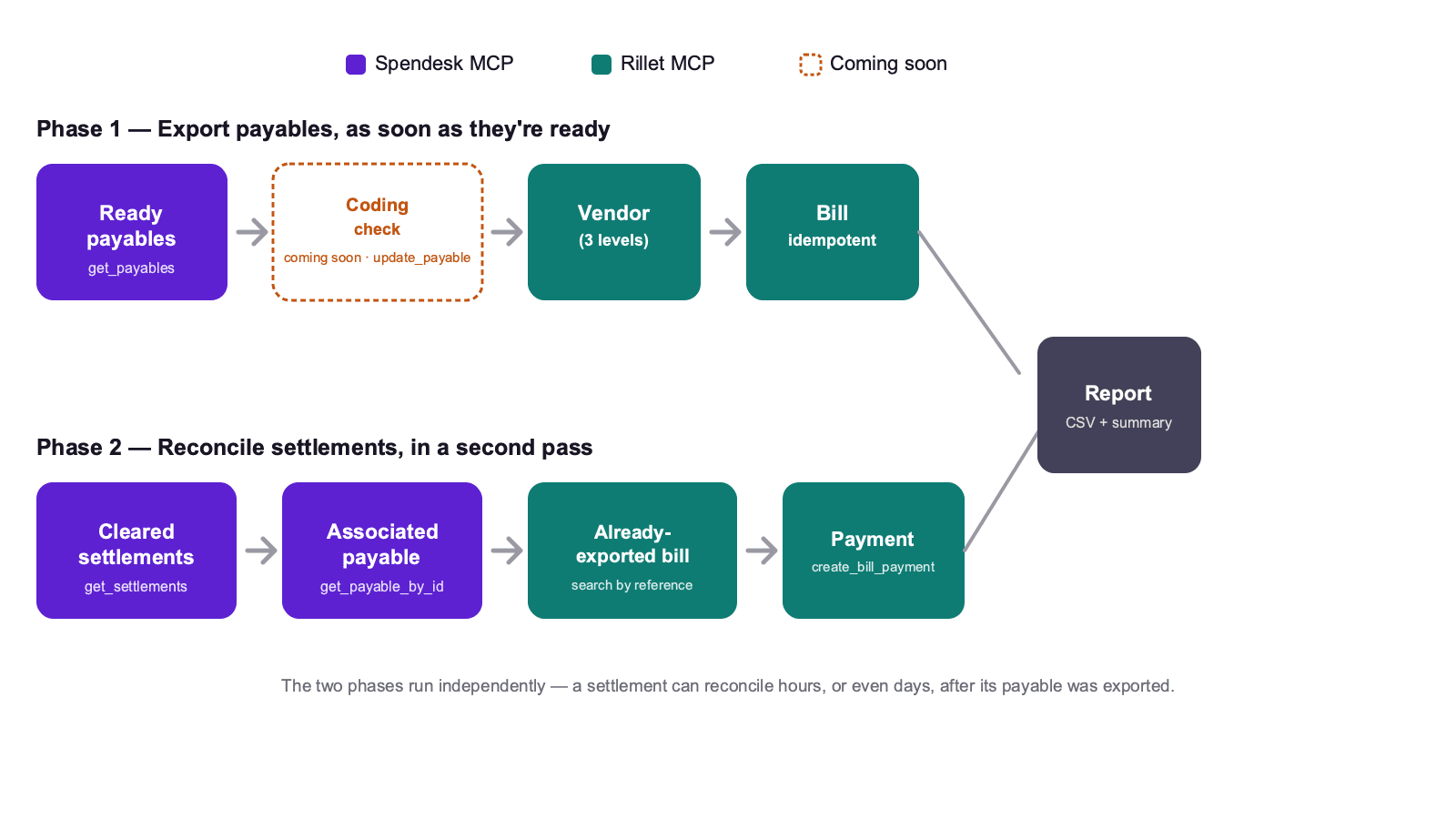
Phase 1 — Export payables, as soon as they're ready
- Ready payables — fetch payables with
bookkeepingStatus = toExport, without waiting for payment. - Coding check — before creating the bill, check that the payable's GL account, cost center, and VAT rate look right. In this run, an anomaly is only flagged in the report; with the
update_payablewrite tool enabled (Beta, off by default), it can be corrected directly on the payable before export, after your confirmation. - Vendor in Rillet — a 3-level search: by external reference (stop if found) → by name (add the external reference if found) → creation (enriched via the attachment and a web search for VAT/address if needed).
- Vendor bill — check no existing external reference, then create with the net amount, VAT if applicable, and the account resolved via category mapping.
Phase 2 — Reconcile settlements, in a second pass
- Cleared settlements — fetch settled settlements, with no timing link to when the underlying payable was exported.
- Associated payable — trace back via
allocations[0].payableId, to find the already-exported bill. - Already-exported bill — found in Rillet by its external reference — never recreated.
- Bill payment — record the payment (gross amount, date, method, Spendesk reference).
A single report can consolidate both phases, but they run independently: a settlement can reconcile hours, or even days, after its payable was exported.
The category-to-account mapping
A concrete example of what a client needs to supply to adapt the skill to their own chart of accounts:
| Spendesk category | Account |
|---|---|
| Tools and subscriptions | 60212 |
| Server and COGS tools | 50220 |
| Salaries | 60110 |
| Services — Payroll | 60120 |
| Benefits & wellness / HR / training | 60130 |
| Contractors, freelancers, externalized salaries | 60190 |
| Workspace — rent, maintenance | 60211 |
| Marketing (ABM, paid, events, PR, sponsored content) | 60213 |
| Travel & expense (T&E) / personal expense | 60214 |
| Workspace — supplies, onboarding, snacks | 60215 |
| Agency, consulting, recruiting, employer branding | 60216 |
| Services — insurance | 60220 |
| Banking charges, KYB | 60221 |
| Financial result | 60222 |
| Taxes | 60223 |
| Unknown or missing category | 60216 (default account) |
Phase 1 illustrated: exporting payables
⚠️ The exchanges below are a typical illustrative example (figures are not real), unlike the NetSuite section below which cites actually-achieved results.
Found 9 payables with `bookkeepingStatus = toExport`. 2 were already exported (external reference already present on their vendor/bill) — skipped.
Idempotency check: none of the remaining 7 bills already existed in Rillet — 7 creations.
Creating the 7 bills now.
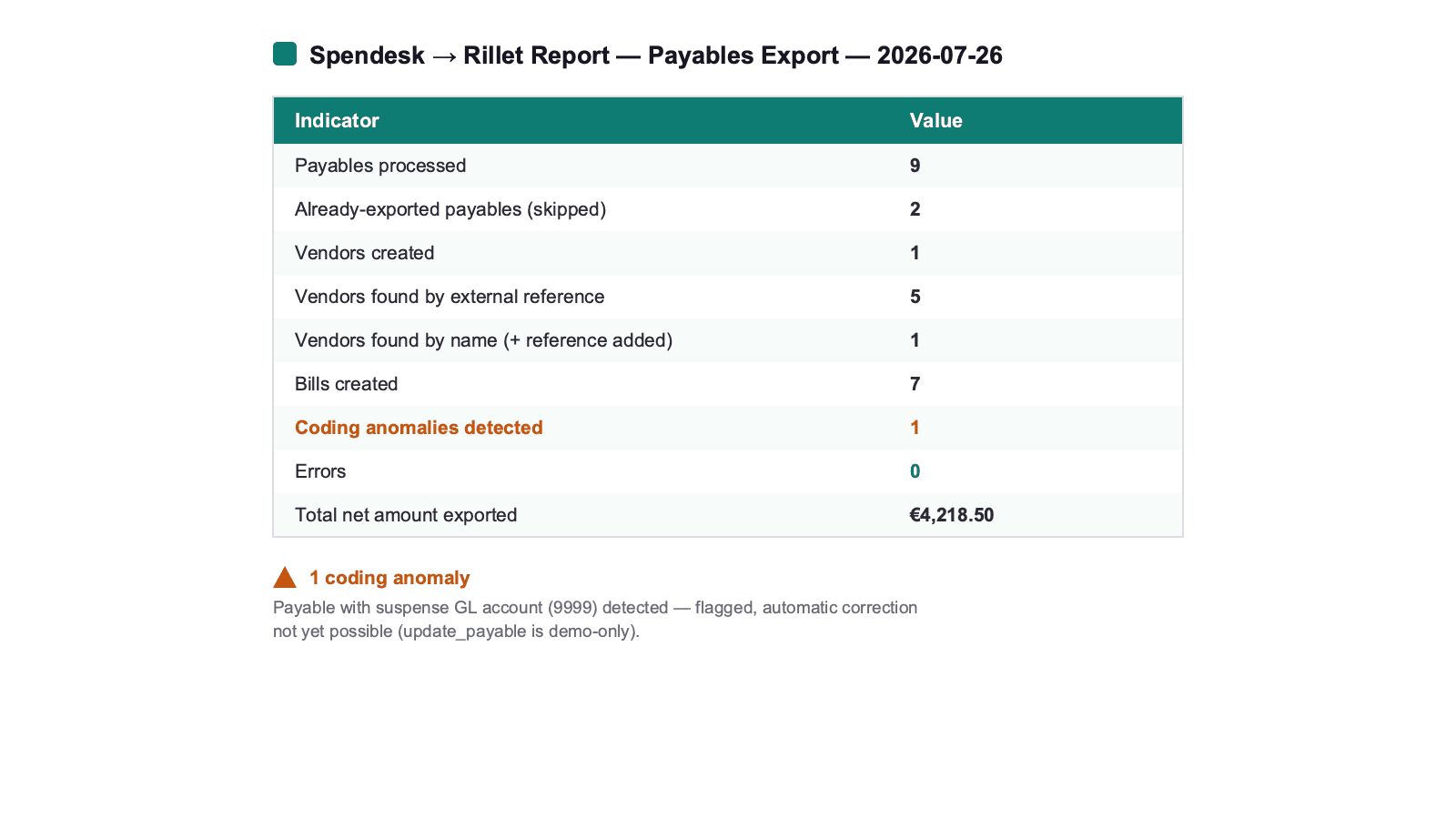
# Spendesk → Rillet Report — Payables Export — 2026-07-26
## Summary
| Indicator | Value |
|---|---|
| Payables processed | 9 |
| Already-exported payables (skipped) | 2 |
| Vendors created | 1 |
| Vendors found by external reference | 5 |
| Vendors found by name (+ reference added) | 1 |
| Bills created | 7 |
| Coding anomalies detected | 1 |
| Errors | 0 |
| Total net amount exported | €4,218.50 |
## ⚠️ Anomalies
Full report available in the generated file.
Phase 2 illustrated: reconciling settlements
A second run, decoupled from the first and triggered on its own schedule, reconciles already-cleared settlements — never recreating a bill:
7 settlements cleared on 2026-07-26. For each one, the associated payable was already exported to Rillet in Phase 1 (external reference found) — no new bill created.
No anomalies: every settlement matched an already-exported bill.
And on the NetSuite side, when there's no MCP?
The same principle (an agent orchestrating, no integration platform in between) also works when the other system has no MCP — except instead of calling an MCP on the other end, the agent talks directly to the system's API, through a client built for the purpose.
That's the case for a second skill, built to test whether this approach generalizes to a structurally different ERP: Spendesk MCP on one side (read tools only), a custom-built NetSuite REST client on the other (OAuth 2.0 client-credentials, JWT signed with ES256, SuiteTalk REST calls). Unlike the Rillet case, there's no native external reference on both sides — the skill maintains its own local mapping table (mapping/suppliers.json, mapping/cost_centres.json) to guarantee idempotency.
This skill is actually running in production against a NetSuite sandbox (tstdrv2793048) — not a simulation:
- A real vendor bill was posted (#32754), carrying the correct vendor, the correct department resolved from the payable's Spendesk cost center, and the correct GL account resolved from the Spendesk account's
externalId. - A real employee expense claim was exported as a NetSuite Expense Report (#32854, "Candy Myers", line "202 6121 Travel Expenses") — not as a vendor bill against an invented vendor.
Two NetSuite gotchas found under real conditions, which show exactly why this per-client discovery step is necessary (nothing generic would have predicted them):
- On this account,
departmentandclassmust be set at both the invoice header AND every line — setting them only at the line level fails, even with an otherwise fully valid tax code. location, by contrast, only needs the line level — the same kind of analytical dimension has a different placement requirement depending on the field.
⚠️ This skill has so far only been proven against a test account (a sandbox), not a real client's account — and its Sage X3 variant (built second, to test generalization) never got past simulation mode: its real write calls are explicitly unimplemented stubs.
Analysis: do Spendesk customers' ERPs already have an MCP?
Spendesk offers native accounting integrations today with NetSuite, Xero, QuickBooks Online, Microsoft Business Central, Odoo, Exact Online, DATEV, Sage 100, ACD, and Pennylane (coming soon). Here's, system by system, whether the "MCP-to-MCP" flow described above is already possible today, or whether it still requires a classic API as with NetSuite above:
| ERP / accounting software | MCP available mid-2026? | Nature |
|---|---|---|
| NetSuite | ✅ Yes | Official — Oracle AI Connector Service (rolled out, expanded March 2026) |
| Microsoft Business Central | ✅ Yes | Official — Microsoft, hosted endpoint, configurable read + write |
| Xero | ✅ Yes | Official — Xero-hosted MCP server |
| QuickBooks Online | ✅ Yes | Official — Intuit, open-source repo from the vendor itself |
| Odoo | ✅ Yes | Native module (Odoo Apps Store) + community implementations |
| Exact Online | ✅ Yes | Community/partner — no confirmed official Exact implementation |
| Pennylane | ✅ Yes | Community (several implementations) — no confirmed official Pennylane implementation |
| DATEV | ⚠️ Partial | Community, limited to file exports — no live transactional API |
| Sage 100 | ❌ None found | (Sage Intacct, a different Sage product, does have an MCP — Sage 100 doesn't) |
| ACD | ❌ None found | — |
Reading this table: 7 of Spendesk's 10 native accounting integrations already have some form of MCP in 2026 — but at very uneven levels of maturity. NetSuite, Business Central, Xero, and QuickBooks are shipped by the vendor itself, in production. Odoo has a native module. Exact Online and Pennylane, for now, only have community implementations — usable, but not vendor-guaranteed. DATEV and Sage 100/ACD still sit in the "MCP-to-API" case illustrated by NetSuite above.
A telling fact: the NetSuite REST client documented in this article was built before Oracle's own official AI Connector Service reached its current maturity. The same pattern will likely repeat for Sage 100 and ACD: "MCP-to-API" isn't a dead end — it's a transitional solution that shrinks as each vendor ships its own MCP.
Key takeaways
- Two ways to connect Spendesk to an accounting system with an agent: MCP-to-MCP when both sides speak the protocol (Rillet), MCP-to-API when the other system doesn't have one yet (NetSuite).
- Exporting payables and reconciling settlements are two decoupled needs: clients want the first as soon as possible, the second can follow at its own pace.
- The next building block, with the
update_payablewrite tool (Beta, off by default): checking and correcting accounting coding before export, not just flagging it after the fact. - Idempotency is the real challenge in both approaches — via a native external reference for MCP-to-MCP, via a local mapping table for MCP-to-API.
- 7 of Spendesk's 10 native ERPs already have an MCP in 2026, at very different levels of maturity — the remaining MCP-to-API cases are a transitional step, not a permanent limit.
- Neither skill is in the public library today: these are advanced use cases with real financial writes, presented here as a case study, not as ready-to-download skills.